
How to Check if ChatGPT Knows Your Business in 10 Minutes

Table of contents
Here is a hypothetical: you type your company's name into ChatGPT on your own logged-in account and get a flattering answer. That account may remember you and your city, so the answer tells you little about what a stranger sees. To check if ChatGPT knows your business as a stranger's ChatGPT does, sign out or start a Temporary chat set to Unpersonalized before your first message, turn Search on and name your city in the prompt.
A free first pass across ChatGPT, Gemini, Perplexity and Google AI Mode takes about ten minutes. You will check whether each one identifies your company, names it when asked for a category and states facts you can verify.
Set up four clean sessions
A clean AI brand check uses a fresh session and records the setup for each engine. The engines retrieve from different sources, so compare their answers separately; the guide to SEO for AI search and answer engines explains the retrieval mechanism.
- →ChatGPT
Open ChatGPT signed out, or open a new chat, select Temporary and choose Unpersonalized before your first message. In each fresh chat, select View all tools then Search, or type
/and select Search. Check that Search is selected before submitting; search responses may include citations. OpenAI's temporary chat instructions distinguish Unpersonalized from Personalized. - →Gemini
Open gemini.google.com signed out, where text questions generally work. If you use a personal Google Account, select Temporary chat next to New chat; it gives no personalized responses and is unavailable on work or school accounts. Check for Sources at the bottom of the answer or inline; no Sources button means the response provided no links. See Google's temporary chat instructions.
- →Perplexity
Open Perplexity in a private browser window without signing in. After each answer, read the listed sources and record their domains.
- →Google AI Mode
In a private window, open google.com/ai, or enter a question on Google and select AI Mode. Type in the Ask anything bar and check the source links in the response. If AI Mode is missing, check the country and language availability on Google's AI Mode help page.
ChatGPT's Personalized temporary option can use existing memories and custom instructions, and you cannot change that choice once the conversation starts. OpenAI also says ChatGPT infers an approximate location from your IP address and a VPN can shift it, so name the city explicitly in local questions. The ChatGPT search instructions explain the Search control and citations.
Run five prompts in fresh chats
Five prompts test your company's identity, shortlist presence, attributes, price and peer group. Replace the placeholders with your details, keep the wording consistent across engines and start a fresh chat for each prompt.
P1: What is [Company] in [city] and what does it do?

P2: Which [category] companies in [city] would you recommend?

P3: Compare [Company] and [Competitor] for [service] in [city].

P4: How much does [Company] in [city] charge for [service]?

P5: What are alternatives to [Company] in [city]?
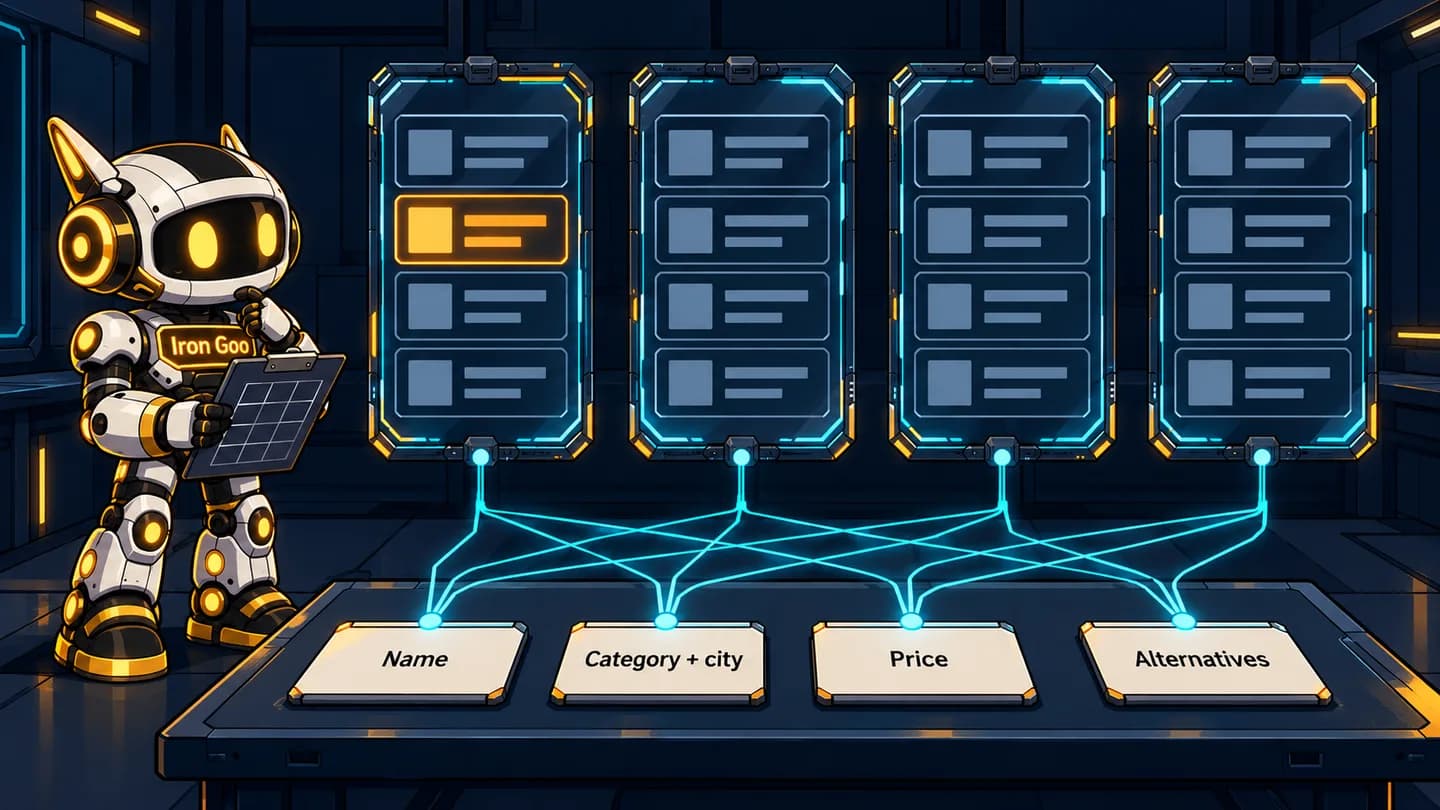
The same cards go to every engine, so a wrong answer appears on one panel and lands on the score sheet.
- P1, name: Check whether the answer identifies your company or a different company with the same name. Recognizing a name and resolving it to the right business are separate checks.
- P2, category and city: Check whether your company appears in an unbranded shortlist. How AI assistants choose businesses to recommend is a separate question.
- P3, comparison: Check which attributes the answer assigns to your company and which are missing or wrong.
- P4, price: Check for a current, sourced price, an admission that the price is unpublished, or an unsupported number.
- P5, alternatives: Check which companies the answer treats as your peers.
Distinguish a useful answer from a wrong one
A useful answer identifies the right business and makes claims you can check against current information. A confident answer can still combine two businesses or repeat an obsolete fact.
| Prompt | Good answer | Bad answer |
|---|---|---|
| P1: Name | Names the right company, current location and services, with a citation to your site or a listing you control. | Mixes you with a same-name company, gives an old address or dropped service, or says you closed. |
| P4: Price | Gives your current price with a citation, or says the price is not published. | States a specific price without a source. |
AI Mode may return only a set of web links when Google lacks enough confidence in the quality or helpfulness of an AI response. Record that as a links-only result, not as a company recommendation.
Open the citation to trace each claim: select a citation or Sources in ChatGPT, Sources in Gemini, a listed source in Perplexity or a source link in AI Mode. Check whether the page actually supports the claim. Do not ask the assistant where it got the fact as your source check: Google says Gemini can misrepresent how it cites sources.
How many times should you run each prompt?
Run each prompt once per engine for the first pass, then run P2 twice more per engine in fresh chats. Record P2 as 0/3 through 3/3: never named, sometimes named or named in all three answers for that wording.
Our arithmetic is five prompts times four engines, or 20 answers for the first pass. Three P2 runs across four engines total 12 answers, eight of them additional if the first-pass P2 counts as run one. The ten-minute budget covers the first pass; repeats add a few minutes.
In SparkToro's study with Gumshoe, 600 volunteers ran 12 prompts 2,961 times across ChatGPT, Claude and Google's AI in November and December 2025. The study was not peer reviewed, and participants kept their usual settings. When ChatGPT and Google's AI were asked the same question 100 times, the chance of the same brand list appearing in any two responses was less than 1 in 100; Claude was slightly more likely to repeat a list. The chance of the same list appearing in the same order was closer to 1 in 1,000 runs.
Brand appearances still varied in frequency: in the study's headphones test, four frequent brands appeared 55% to 77% of the time. Three runs cannot establish a reliable percentage. Rand Fishkin's takeaway from the study is to ask at least 60 to 100 times and average the results to understand an AI's set of recommendations. For a percentage over time, use the separate approach to measuring AI visibility.
Record each answer on a score sheet
A score sheet separates a company named in the answer from a company whose page appears only as a source. If your URL is cited but your name is absent from the text, mark N for named and record the domain under cited sources.
The following rows are hypothetical: Harbor Field Services is your company and Cedar Works is a competitor. Use one row per answer and list each wrong fact separately.
| Date | Engine | Setup | Prompt | Named in text (Y/N) | Identity right (Y / other company / mixed) | Wrong facts (each listed) | Cited sources (domains) | Competitors named |
|---|---|---|---|---|---|---|---|---|
| Day 1 | ChatGPT | Temporary unpersonalized, Search on | P1 | Y | mixed | Old address; service no longer offered | harborfield.example | None |
| Day 1 | Gemini | Signed out | P2, run 1 | N | None observed | harborfield.example | Cedar Works | |
| Day 1 | AI Mode | Signed out, private window | P4 | Y | Y | Unsupported price | None | None |
Use the identity column when the answer gives enough detail to assess the company. If it does not, leave the cell blank; absence from a category list alone does not establish an identity error.
Choose the first wrong fact to fix
Iron Goo's opinion is to fix errors in the following order, because identity and status errors can distort later answers, while contact errors can send a buyer elsewhere.
- Identity and status: The answer describes another company, combines two companies, or says yours closed or moved.
- Contact and location: The phone, address or service area is wrong.
- Price and services: A stated price is unsupported or out of date, or a service is described incorrectly.
- P2 shortlist absence: Treat this as a visibility question for repeated measurement, not a wrong fact to correct.
Within a tier, start with the error appearing on the most engines. Write down the cited source for each wrong fact, because that source is where the correction process for AI answers starts. If several engines show identity errors or omit your company from category answers, Iron Goo's AI visibility service can run the test at scale and document the sources.
Put your next steps in order
Build on what you have just read with a free ebook on semantic SEO and AI visibility. Get worked examples, decision rules, checklists and a do-this-week action in every chapter, plus a six-week plan for your site.